Dê à sua IA o contexto do cliente que faltava
Conecte os sinais dos clientes de forma estruturada e em tempo real ao Claude, ChatGPT, Gemini, Glean ou Cursor para que sua IA realmente entenda seus clientes.





E se cada resposta da IA fosse fundamentada no que seus clientes realmente disseram?
Hoje, suas ferramentas de IA são tão inteligentes quanto os dados que você fornece a elas. Elas conhecem seus documentos, seus tickets, suas planilhas, mas estão voando às cegas em relação à voz do seu cliente. O conector MCP da Birdie muda isso. Em segundos, sua IA obtém acesso em tempo real a inteligência do cliente unificada e estruturada em todos os canais — avaliações, NPS, suporte, pesquisa — pronta para analisar.
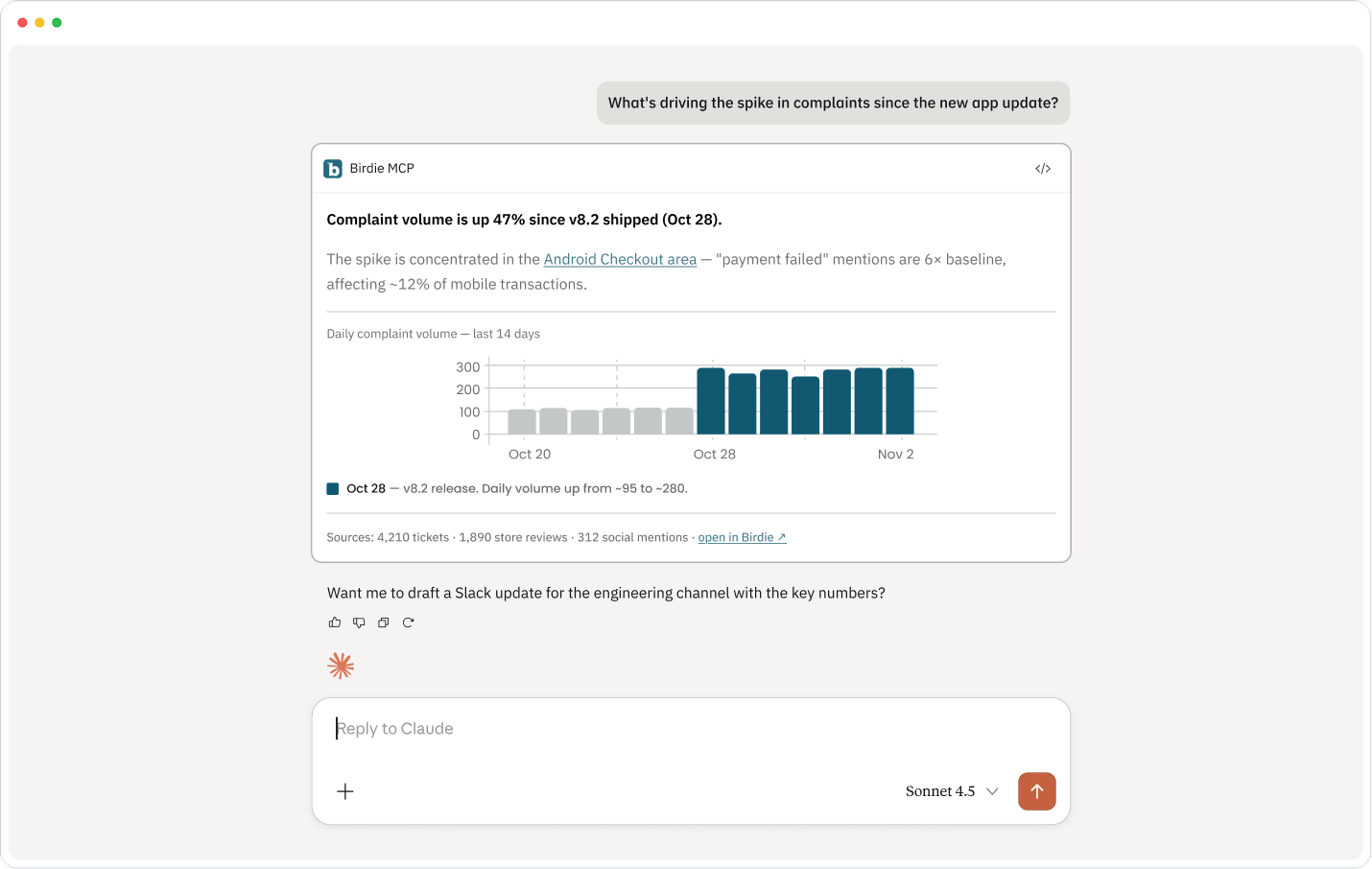
Três passos para uma IA que entende o cliente
Nada de engenharia. Conecte-se em minutos e comece a fazer perguntas para as quais sua equipe sempre precisou de respostas.

Conecte sua ferramenta de IA
Instale o conector MCP da Birdie a partir das configurações do Claude, ChatGPT, Gemini, Glean ou Cursor. Autentique-se com sua conta Birdie via OAuth — em menos de dois minutos.

A Birdie revela a inteligência do cliente
Sua IA obtém acesso seguro e em tempo real à camada unificada de dados do cliente da Birdie — temas estruturados, sinais de sentimento, verbatins, tendências e métricas de todas as fontes de feedback que sua organização conectou.

Pergunte o que quiser. Obtenha a verdade do cliente.
Consulte todo o feedback dos seus clientes em linguagem natural. Obtenha respostas instantâneas e fundamentadas — apoiadas por evidências reais dos seus clientes, não por alucinações de dados de treinamento.
O que a sua equipe realmente vai perguntar
Passe de prioridades alinhadas para a execução, acompanhando o progresso e comprovando o impacto nos negócios de cada iniciativa.
"Quais são as 5 principais reclamações deste mês? Mostre-me os verbatins."
O query_feedback da Birdie revela temas classificados com evidências de suporte. Chega de vasculhar planilhas ou de consultar seus CSMs para palpites.
"Mostre-me as tendências de NPS nos últimos 6 meses, divididas por segmento."
Análise baseada em tempo com filtragem por segmento — o tipo de visualização que antes levava meio dia para um analista de dados montar.
"Encontre feedbacks negativos sobre o onboarding de clientes enterprise no 1º trimestre."
Consultas com múltiplos filtros por sentimento, tópico, segmento e tempo. Transforme sinais qualitativos em um backlog de produto priorizado — rapidamente.
"Compare as pontuações de satisfação em todas as nossas fontes de dados — tickets de suporte, avaliações e NPS."
Benchmarking multicanal em um único prompt. Veja onde sua CX é forte e onde está falhando, sem precisar juntar planilhas.
"O que os clientes dizem que gostariam que tivéssemos, que encontraram em outro lugar?"
Extraia sinais competitivos do feedback orgânico do cliente em avaliações e respostas de texto aberto — aqueles que seus concorrentes não conseguem ver.
"Prepare um relatório de saúde do cliente para a diretoria: sentimento, principais pontos de dor e riscos emergentes neste trimestre."
Transforme todo o seu feedback em uma narrativa pronta para o board — sob demanda, em segundos, apoiada pela análise da pontuação de impacto por área.
Não apenas dados. Uma camada de contexto do cliente.
Há uma diferença significativa entre conectar sua IA a feedback bruto e conectá-la a inteligência de cliente estruturada e confiável.

Todo o seu feedback, unificado
A Birdie agrega sinais de avaliações, NPS, CSAT, tickets de suporte, pesquisas no produto e entrevistas de pesquisa em uma única camada estruturada. Sua IA analisa o panorama completo, não fragmentos.

Estruturado, não apenas extraído
O feedback bruto é ruidoso. A Birdie pré-estrutura tudo em áreas, oportunidades, segmentos e impact score — para que a sua IA recupere um contexto limpo e significativo, em vez de alucinar padrões a partir do ruído.

Seguro by design
O MCP da Birdie utiliza OAuth 2.1 com PKCE. Os seus dados permanecem na infraestrutura segura da Birdie. O conector concede às ferramentas de IA acesso apenas de leitura e limitado — cada pedido é autenticado e vinculado apenas à sua organização.
O que é o MCP e por que é importante?

MCP (Model Context Protocol) é um padrão aberto que permite que ferramentas de IA como Claude, ChatGPT e Gemini se conectem de forma segura a fontes de dados externas em tempo real. Em vez de copiar e colar feedback numa janela de prompt, o MCP fornece à sua IA um feed de dados de clientes em tempo real e estruturado — para que cada resposta seja baseada em evidências reais, e não apenas em dados de treino ou no que por acaso colou.
Quais ferramentas de IA são suportadas atualmente?
O conector MCP da Birdie funciona com qualquer cliente compatível com MCP. Atualmente suportado: Claude (claude.ai e Claude Code CLI), Cursor, ChatGPT, Gemini e Glean. Qualquer cliente que suporte OAuth 2.1 pode conectar-se utilizando o URL do servidor https://app-api.birdie.ai/mcp.
Como funciona a autenticação?
O Birdie MCP utiliza OAuth 2.1 com PKCE — inicia sessão com a sua conta Birdie regular. Quando se conecta, é redirecionado para a página de login do Birdie. Após iniciar sessão, o seu cliente MCP recebe um token de acesso automaticamente. A sua organização é resolvida a partir da sua conta, para que a IA veja apenas os seus dados. As sessões podem expirar periodicamente — o seu cliente irá pedir-lhe para se autenticar novamente quando necessário.
A que dados a IA tem acesso?
A IA obtém acesso apenas de leitura ao seu workspace Birdie — temas de clientes, tendências de sentimento, citações textuais, volume de feedback, segmentos, áreas, oportunidades e métricas de impacto em todas as suas fontes de dados conectadas. Não pode escrever ou modificar quaisquer dados no Birdie. Todas as consultas são automaticamente limitadas à sua organização — a IA nunca vê dados de outros clientes Birdie.
Quanto tempo demora a configuração?
Menos de cinco minutos para o Claude (claude.ai). Abra Definições → Conectores, adicione o URL do servidor https://app-api.birdie.ai/mcp, autentique-se e estará pronto a usar. As configurações do Cursor e da CLI demoram um pouco mais, mas não exigem engenharia — apenas um ficheiro de configuração ou um único comando de terminal.
Como a IA sabe o que consultar?
O servidor MCP da Birdie inclui uma ferramenta get_schema que informa a IA quais campos, métricas e valores de filtro estão disponíveis antes de executar qualquer consulta. Isso significa que a IA planeia as suas consultas com precisão, em vez de adivinhar — irá vê-la frequentemente a chamar ferramentas de esquema e taxonomia automaticamente em segundo plano antes de responder a perguntas complexas. Este é um comportamento esperado, não um problema de desempenho.
Preciso de uma conta Birdie?
Sim — o conector MCP apresenta informações do seu workspace Birdie, por isso precisa de uma conta Birdie ativa com as suas fontes de feedback conectadas. Se ainda não é cliente, solicite uma demonstração para vê-lo em ação com os seus próprios dados.
Veja a Birdie em ação
Veja como a Birdie transforma sinais dos clientes em decisões sobre retenção, expansão e adoção. Apenas 30 minutos de demonstração ao vivo com resultados.